-
首先安裝 Chocolatey
-
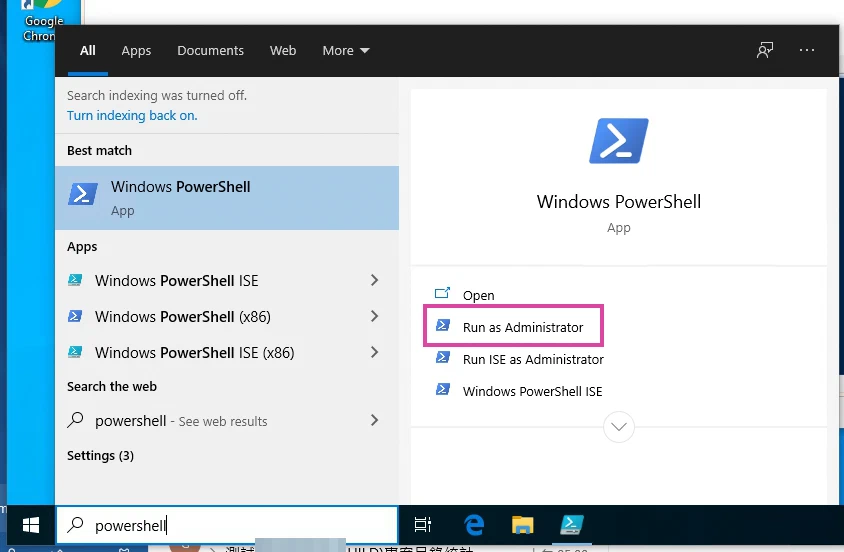
以系統管理員限開啟 powershell
-
貼入下列語法:
# install chocolatey Set-ExecutionPolicy Bypass -Scope Process -Force; [System.Net.ServicePointManager]::SecurityProtocol = [System.Net.ServicePointManager]::SecurityProtocol -bor 3072; iex ((New-Object System.Net.WebClient).DownloadString('https://chocolatey.org/install.ps1')) -
待貼入的語法完成後,即完成 Chocolatey 的安裝 & 設定,可使用下列語法來檢查是否完成安裝:
choco -? -
確認 Chocolatey 完成安裝後,於原本的 powershell 視窗中繼續貼上下列語法:
choco install   7zip aspnetcore-runtimepackagestore azure-data-studio `
                dotnetcore-windowshosting fiddler filezilla git `
                GoogleChrome jmeter libreoffice-still microsoftazurestorageexplorer `
                nodejs openjdk8redhatbuild postman powertoys `
                sql-server-management-studio tortoisegit tortoisesvn vscode -y
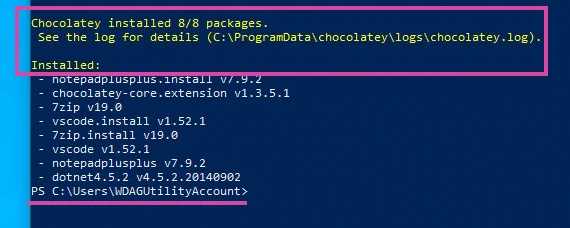
待視窗結束安裝程序,回報已完成安裝套件時,即完成全部的工具安裝,以下以安裝 7zip、vscode、notepad++ 示意結束安裝的畫面:
-
由於公司 Visual Studio 或 Office 等授權需視人員資格,並非所有人都有,所以沒有一併包裹在指令中安裝,請確認有配到授權後,另行自行安裝。