文件日期:2022/12/07
既有的部門 Nuget Server 將由 http://my-nuget/ 遷移至 https://gitlab.example.com/
新的 Nuget Package Source 路徑為:https://gitlab.example.com/api/v4/projects/940/packages/nuget/index.json
開發人員調整
步驟一、建立 Gitlab 的 Personal Access Token
-
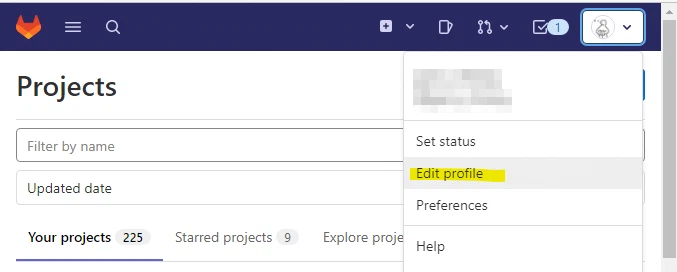
點選 Gitlab 右上角的個人頭像,並點選 Edit profile
-
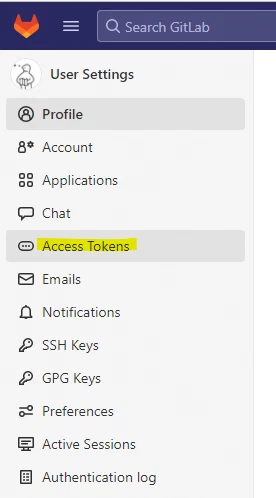
點選左邊功能列上的 Access Token
-
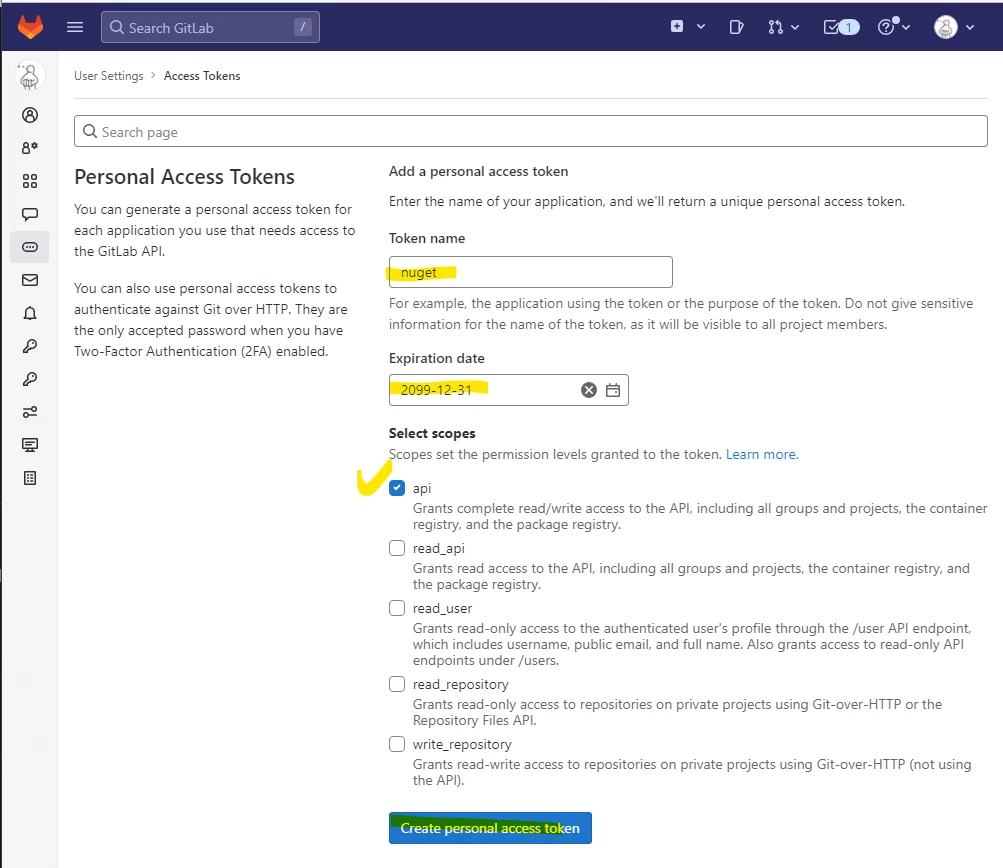
於頁面上依序填寫:
- Token Name 為別名,取自己看得懂的就好
- Expiration date 在目前的 Gitlab 版本為必填,但可以填一個很遠的日期,譬如
2099-12-31 - Select scopes 勾選 api
- 全部填寫及勾選完畢後,點選最下方藍色的 Create personal access token
-
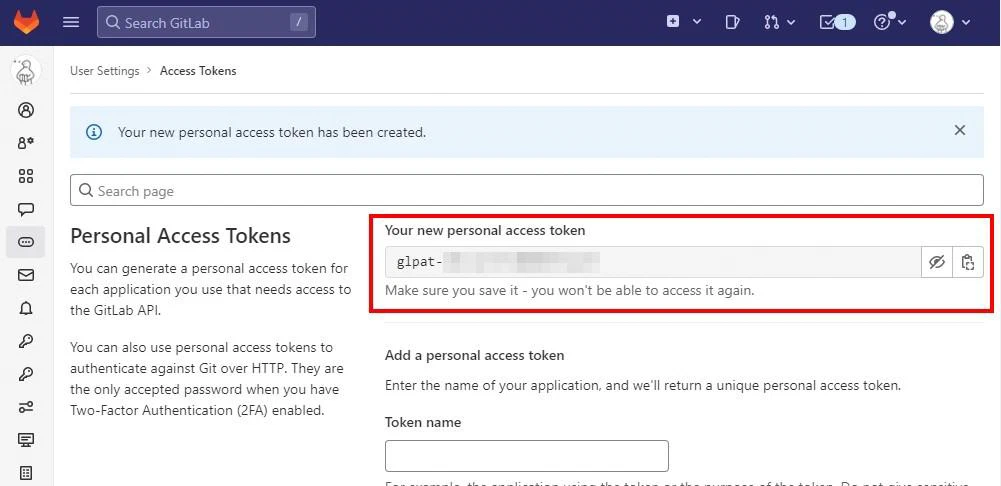
點選後會回到畫面最上方,並提示 Your new personal access token has been created.,請複製紅框內的 access token, 離開這個頁面之後將無法再取得這個 token 值。
步驟二、於開發機增加新的 Nuget source
於 Visual studio 增加 Nuget source
-
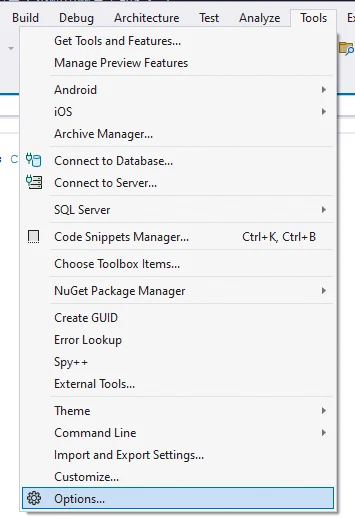
開啟 Visual Studio,並點選 Tools -> Options
-
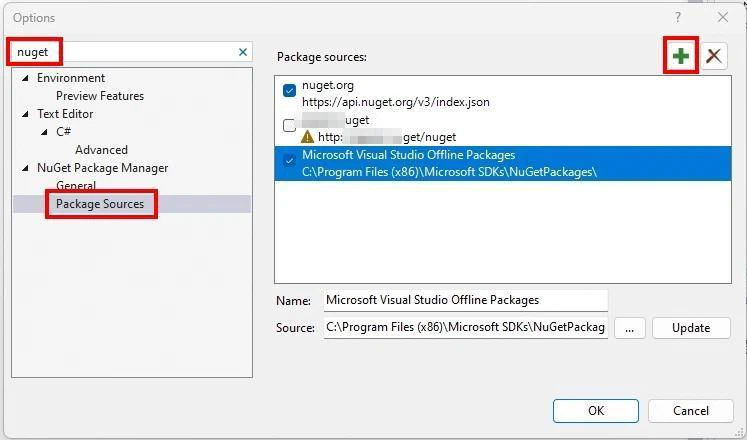
於上方搜尋欄中輸入 nuget,找到 Nuget Package Manager 的 Package Sources,
-
移除既有的 http://my-nuget/nuget 網址,並點選右上角的綠色加號。
-
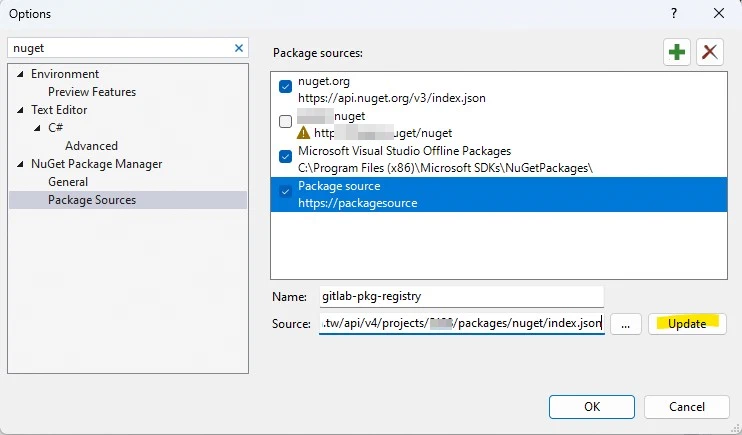
點選加號後,中間的 Package sources 會出現新的 Package source,此時將新的 Package source 選起,並修改下方的 Name & Source,確認完畢後按下 OK 關閉設定畫面
- Name 依自己看得懂的方式指定
- [ ⚠️ 重要 ] Source 請指定為:https://gitlab.example.com/api/v4/projects/940/packages/nuget/index.json
- [ ⚠️ 重要 ] 填寫完成後按下右邊的 Update,並確認中間的 Sources 從原本的 Package source 變更為你指定的 Name 以及 Source
-
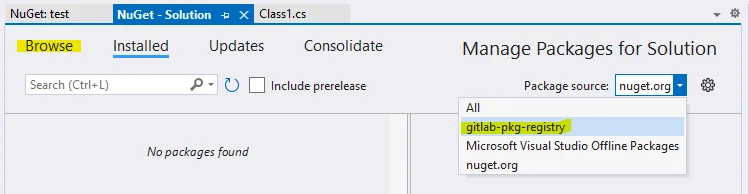
於方案(或專案)上按下右鍵,點選 Manage Nuget Packages for Solution...,開啟 Nuget 套件管理員,並在 Package source 的選單中切換到剛剛新增的 Package source,並點選最右邊的 Browse。
-
此時會出現填寫帳號密碼的畫面:
- 使用者帳號輸入自己的 Gitlab 帳號
- 密碼輸入剛剛於 Gitlab 上取得的 Personal Access Token,不要輸入自己的 AD 密碼!!
- 勾選記住密碼
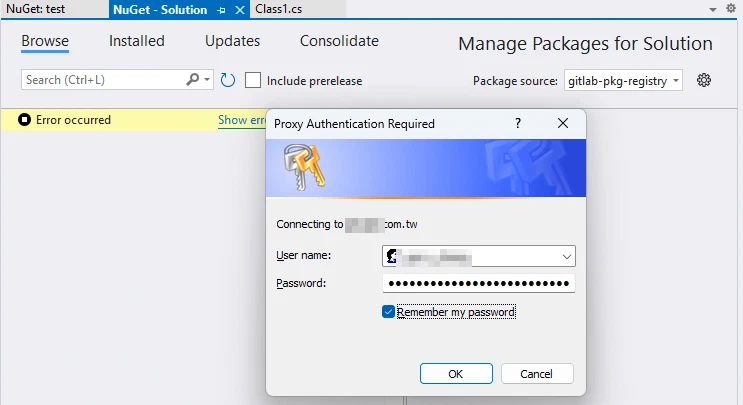
註:畫面中連線至 git.example.com 為撰寫文件使用的測試 repo,實際應以文件最上方提供的設定值為主。
-
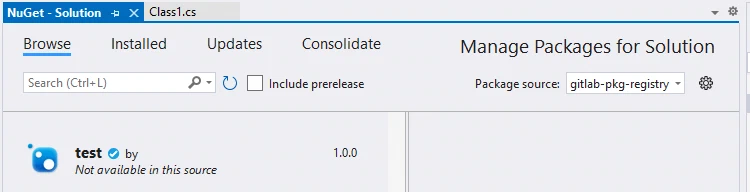
確認後,應可於套件清單中看到部門自行開發的套件
(選讀) 以指令方式增加 nuget source
💡💡💡 👉 以下指令,請都以 Powershell 視窗執行,勿使用命令提示字元(CMD)介面。 此章節內容與 於 Visual studio 增加 Nuget source 達成的效果相同,如果對指令介面操作不熟悉,可使用 Visual Studio 的圖形化介面工具來協助。
💡💡💡
使用 dotnet cli 來新增 nuget source
開發環境需安裝 .NET Core 3.1 以上
dotnet nuget add source https://gitlab.example.com/api/v4/projects/940/packages/nuget/index.json `
   --name gitlab-pkg-registry `
   --username 你的名字 `
   --password 你的PAT `
   --store-password-in-clear-text
所有必填及可選參數如下:
dotnet nuget add source <PACKAGE_SOURCE_PATH>
[--name <SOURCE_NAME>]
[--username <USER>]
[--password <PASSWORD, aka Gitlab PAT>]
[--store-password-in-clear-text]
[--valid-authentication-types <TYPES>]
[--configfile <FILE>]
REF: https://learn.microsoft.com/en-us/dotnet/core/tools/dotnet-nuget-add-source
使用 nuget.exe 來新增 nuget source
需先在 nuget.org 上下載 nuget.exe,可直接下載 Windows x86 Commandline 的 recommended latest 執行檔
nuget.exe source add  -name gitlab-pkg-registry `
   -source https://gitlab.example.com/api/v4/projects/940/packages/nuget/index.json  `
   -Username 你的名字 `
   -Password 你的PAT `
   -StorePasswordInClearText
所有必填及可選參數如下:
nuget source add
[-Name <SOURCE_NAME>]
[-Source <PACKAGE_SOURCE_PATH> ]
[-Username <USER>]
[-Password <PASSWORD, aka Gitlab PAT>]
[-StorePasswordInClearText ]
[-ValidAuthenticationTypes ]
[-Format ]
[-Help ]
[-Verbosity ]
[-NonInteractive ]
[-ConfigFile ]
REF: https://learn.microsoft.com/zh-tw/nuget/reference/cli-reference/cli-ref-sources